
Playwright flaky tests pass and fail on the same code, and they’re the most expensive tests you can own. Every red build that turns out to be “just flaky” teaches the team to ignore red builds. Once that habit sets in, your suite stops protecting you, and it still costs you CI minutes.
I’m not the only one bothered by this. The State of JS 2025 testing results list it among the top four testing pain points. The other three are mocking, configuration, and long run times.
The problem isn’t new, either. In 2016, Google reported that about 1.5% of all its test runs were flaky. About 16% of its tests showed some flakiness (Google Testing Blog).
Most flaky-test advice stops at “turn on retries.” Retries manage the symptom, though; they don’t cure it. So here’s the triage process I’d run to drive flaky tests in Playwright down and keep them down.
Step 1: Make Playwright flaky tests visible first
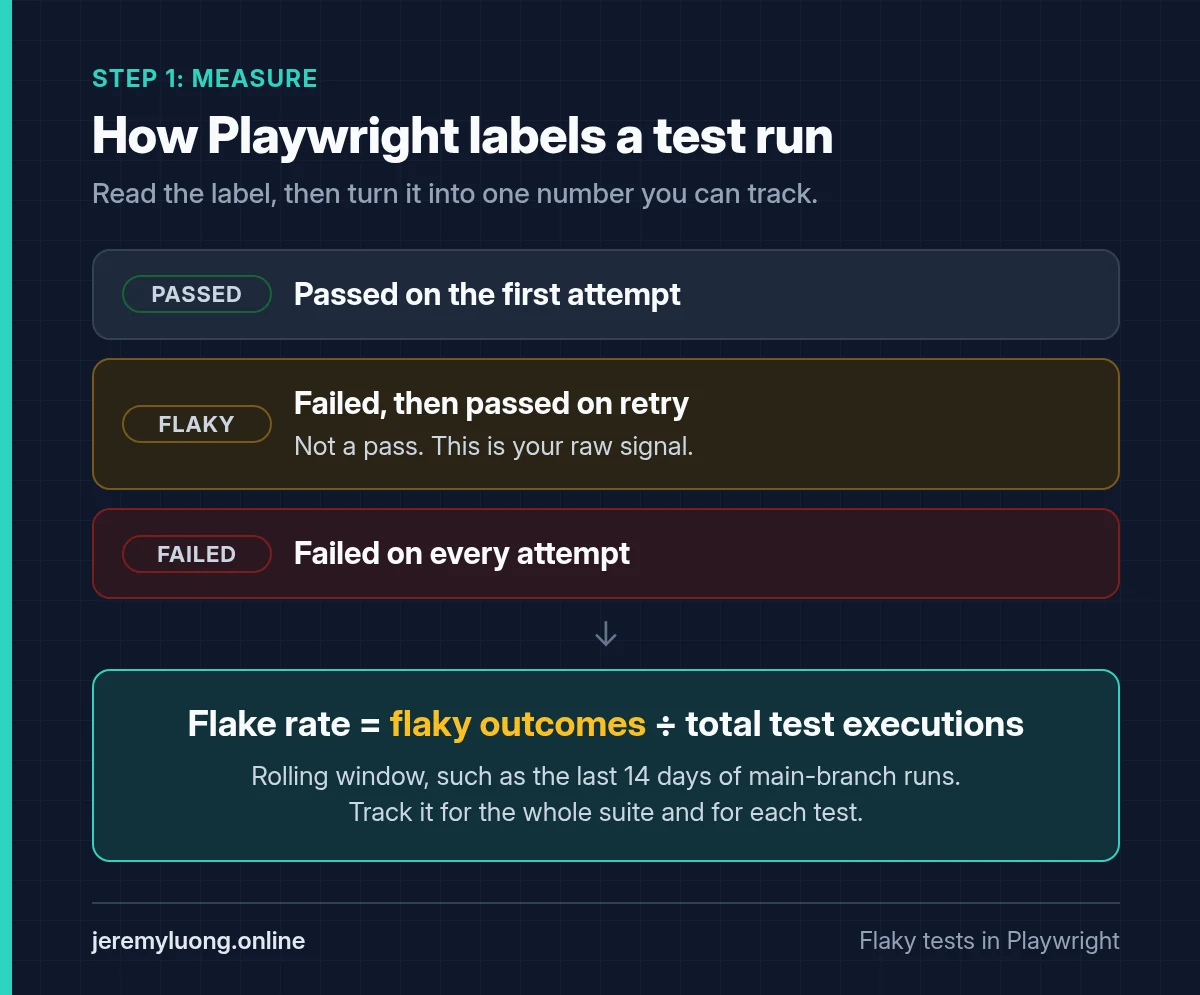
You can’t triage what you don’t measure. Playwright sorts every test into one of a few outcomes, and a test that fails and then passes on retry is reported as flaky, not passed. That’s how Playwright flaky tests announce themselves, and that label is your raw signal. Most teams just never look at it.
Start with a config that retries only in CI and captures evidence on the first retry:
// playwright.config.ts
import { defineConfig } from '@playwright/test';

export default defineConfig({
  retries: process.env.CI ? 2 : 0,
  reporter: [
    ['html', { open: 'never' }],
    ['json', { outputFile: 'test-results/results.json' }],
  ],
  use: {
    trace: 'on-first-retry',
    screenshot: 'only-on-failure',
    video: 'retain-on-failure',
  },
});
The JSON reporter is what makes measurement cheap. A short script counts flaky outcomes per test on every CI run:
// scripts/flake-report.ts
import fs from 'node:fs';

const report = JSON.parse(fs.readFileSync('test-results/results.json', 'utf8'));
const flaky: string[] = [];

function walk(suite: any, path: string[] = []) {
  for (const spec of suite.specs ?? []) {
    for (const test of spec.tests ?? []) {
      if (test.status === 'flaky') flaky.push([...path, spec.title].join(' › '));
    }
  }
  for (const child of suite.suites ?? []) walk(child, [...path, child.title]);
}

report.suites.forEach((s: any) => walk(s, [s.title]));
console.log(`Flaky tests this run: ${flaky.length}`);
flaky.forEach((t) => console.log(` - ${t}`));
Push that output somewhere persistent, like a CI artifact, a small database table, or a Slack message. You want a history per test, not a one-off snapshot.
The one KPI worth tracking: flake rate
Flake rate = flaky outcomes ÷ total test executions over a rolling window (a common window is the last 14 days of main-branch runs). Track it for the whole suite and for each test. A suite-level number tells leadership whether things are improving. The per-test number tells you where to spend the next hour.
Don’t set the target at zero on day one. Set it at “lower than last sprint,” and make the top five offenders a standing item in your team’s backlog.
Step 2: Reproduce on purpose
A test that flakes once a week in CI is hard to debug. One that flakes once in twenty local runs is easy. Playwright gives you the tools to reproduce them on demand:
# Hammer one test to expose intermittent failures
npx playwright test tests/checkout.spec.ts --repeat-each=20 --workers=4

# Fail the build if anything only passed on retry (great for PR gates)
npx playwright test --fail-on-flaky-tests

# Same gate, limited to tests affected by your branch
npx playwright test --only-changed=origin/main --fail-on-flaky-tests

# Open the trace captured on the first retry
npx playwright show-trace test-results/<test-folder>/trace.zip
Raising --workers while repeating is deliberate. Many flakes only show up under parallel load, when tests compete for shared data or a slow backend. If a test only fails with more workers, you’ve already narrowed the root cause to isolation or timing.
The trace viewer is the biggest advantage I’ve found in Playwright for this work. It gives you the DOM snapshot before and after each action, network calls, console logs, and the exact locator that resolved. Read the failed attempt and the passing retry side by side. The difference between them is usually the bug.
Step 3: The decision tree (retry, quarantine, or fix)
Every flaky test gets exactly one of three outcomes. To decide, run through these questions in order:
- Is the failure caused by the product, not the test? Think of a real race condition in the app, an API that sometimes returns 500, or a UI that renders twice. If so, it’s a bug. File it against the product and keep the test red, because the test is doing its job.
- Can you identify the root cause from the trace within about 30 minutes? If so, fix it now (see Step 5). That’s almost always cheaper than any other option.
- Does the test cover a critical user path, like login, checkout, or payment? If so, don’t quarantine it. Keep it in the main run with retries, assign an owner, and give it a fix-by date. Losing coverage on critical paths is worse than a noisy build.
- Otherwise, quarantine it with an owner and an expiry date (see Step 4).
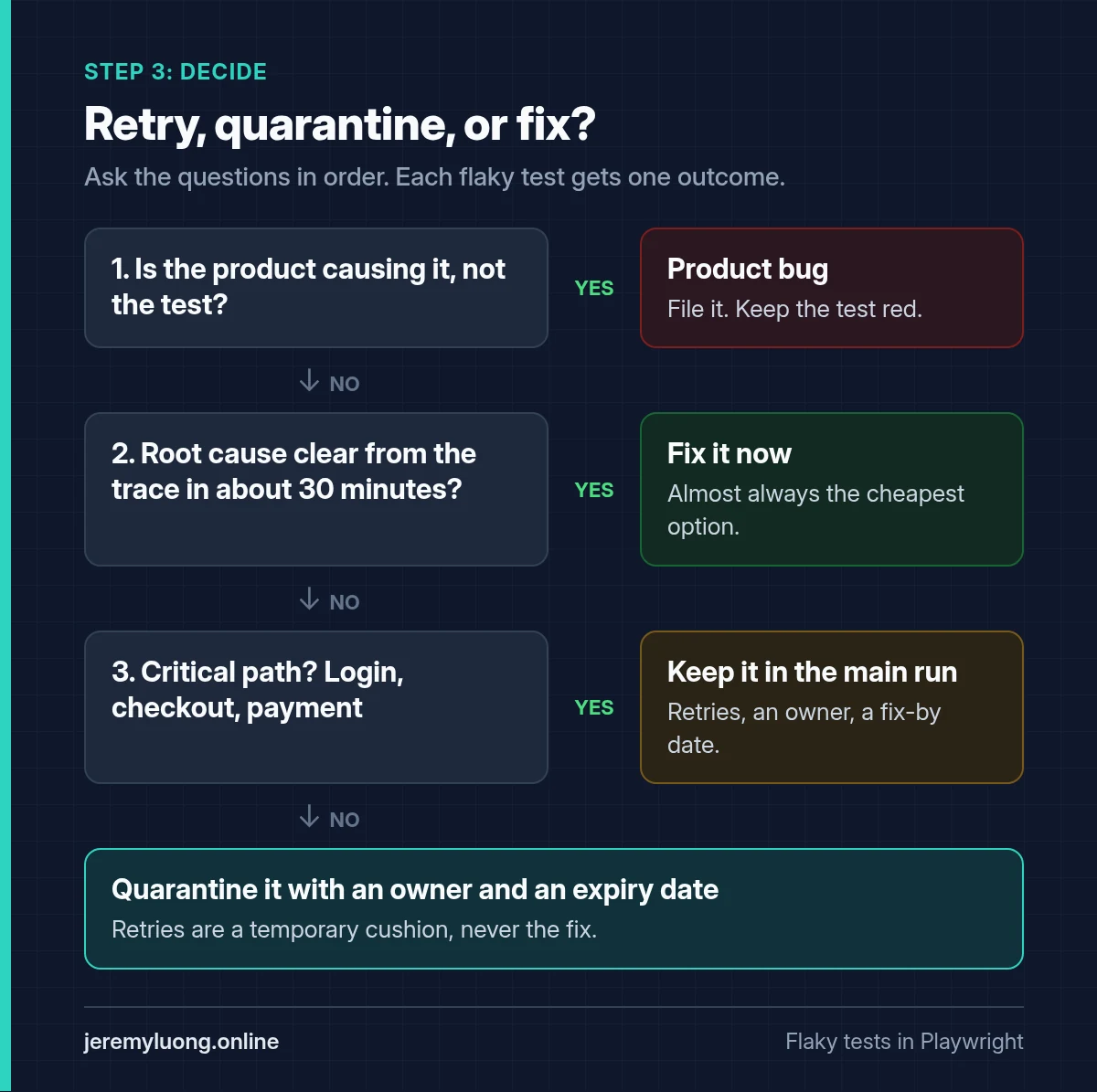
Retries are never the fix. They’re a temporary cushion while you work through steps 2 to 4. If a test needs retries for more than a sprint, it has quietly become a quarantined test, and nobody decided that on purpose.
Step 4: A quarantine policy that expires
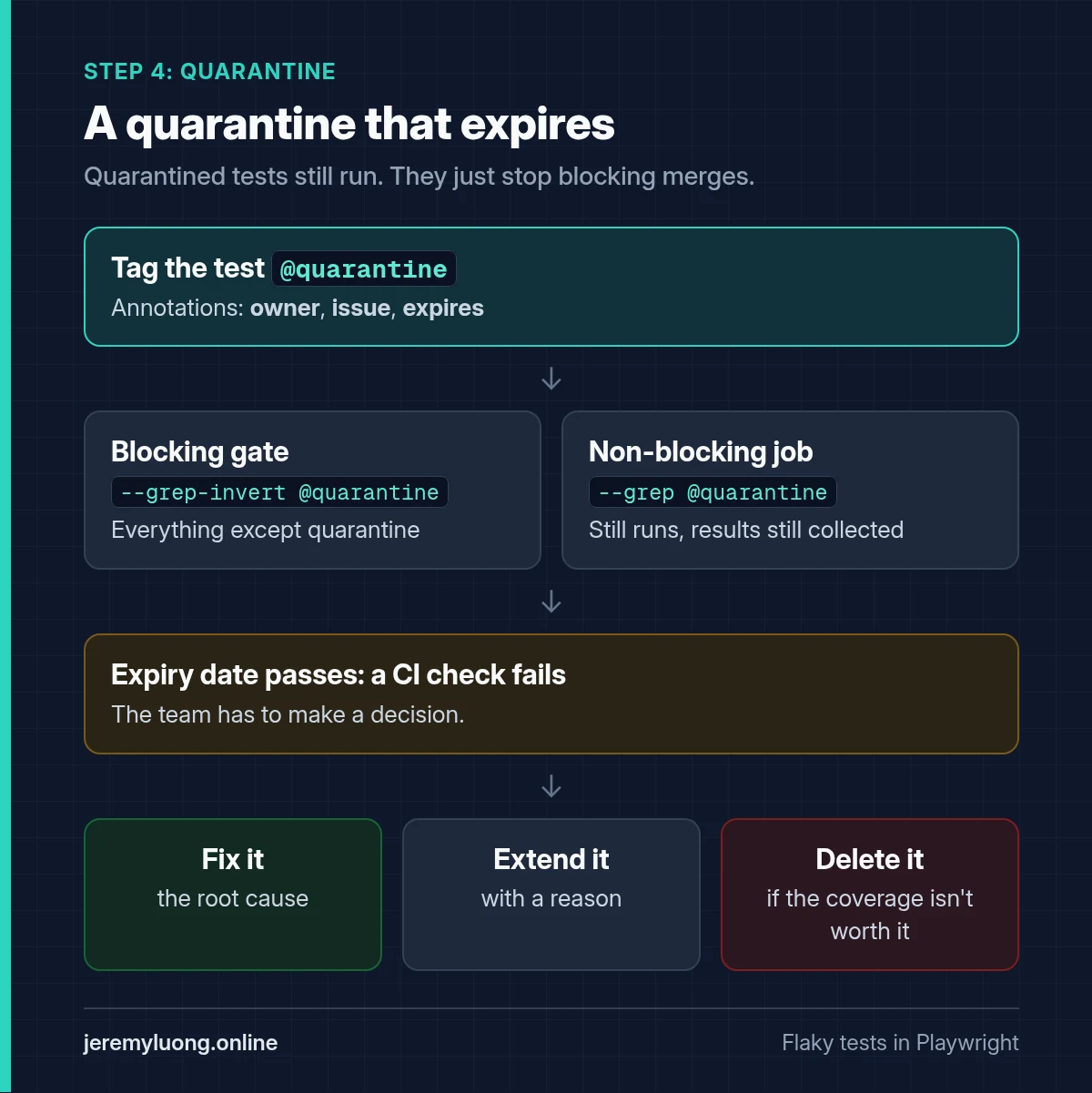
Quarantine done wrong is just deletion with extra steps. Teams tag flaky tests in Playwright, move them out of the gate, and forget them. A solid rule: a quarantined test has an owner, a ticket, and an expiry date, and it still runs.
Playwright’s tag support makes this clean:
import { test, expect } from '@playwright/test';

test('applies a discount code at checkout', {
  tag: '@quarantine',
  annotation: [
    { type: 'owner', description: 'payments-team' },
    { type: 'issue', description: 'QA-1234' },
    { type: 'expires', description: '2026-11-15' },
  ],
}, async ({ page }) => {
  // ...
});
Then split the pipeline so quarantined tests still run but don’t block merges:
# Blocking gate: everything except quarantine
npx playwright test --grep-invert @quarantine

# Non-blocking job: quarantine only, results still collected
npx playwright test --grep @quarantine || true
Add a small CI check that fails if any expires annotation is in the past. That forces a decision when the date passes: fix it, extend it with a reason, or delete it because the coverage isn’t worth having. Any of those is fine. Leaving it to rot is not.
Step 5: The root causes behind most Playwright flaky tests
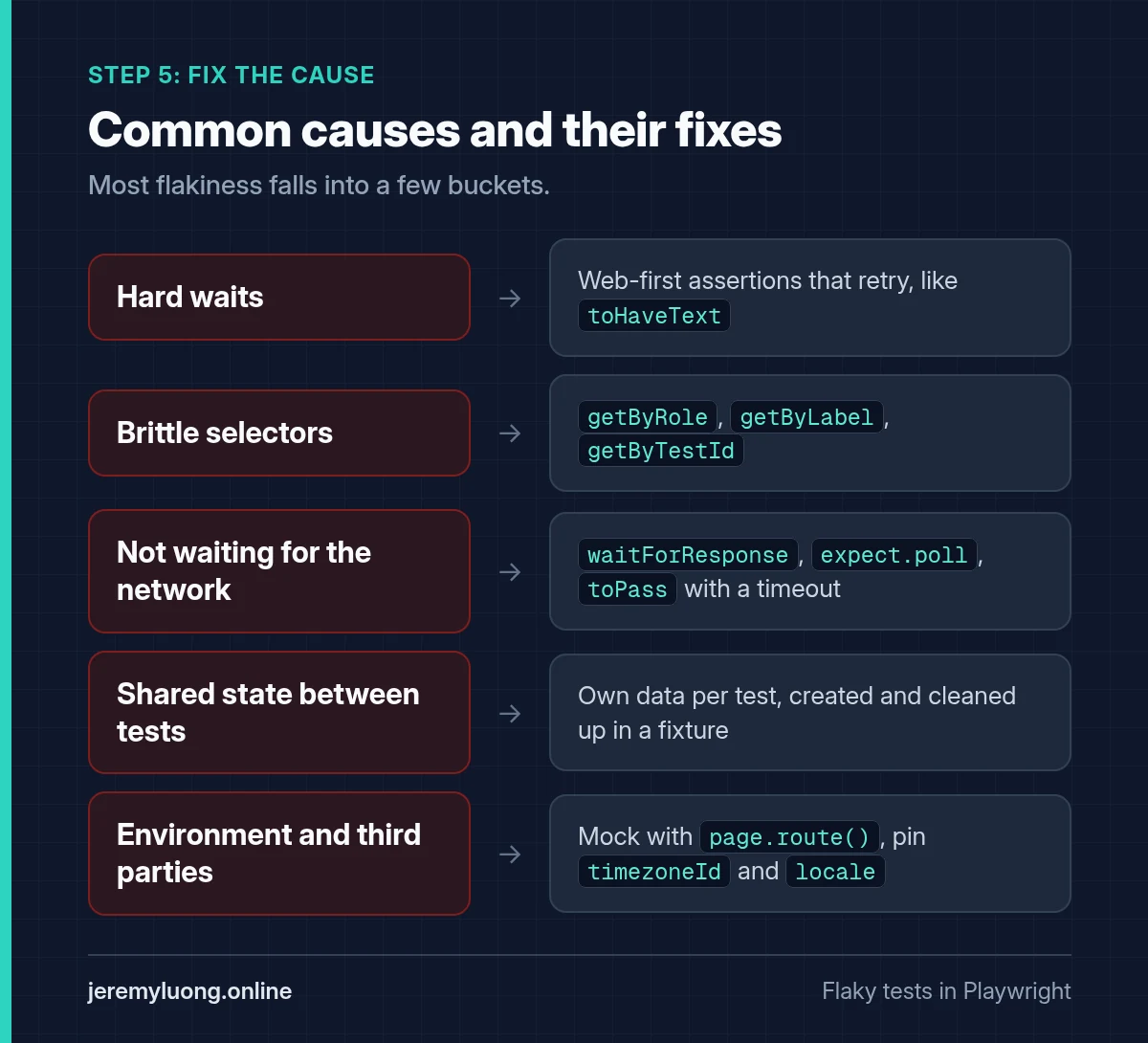
When teams audit a suite, most of the flakiness falls into a few buckets. Here they are, with the fix for each one.
Hard waits and manual timing
page.waitForTimeout(2000) is a guess about how slow your app is. In CI, it eventually guesses wrong. Use web-first assertions instead. They retry until the condition is true or the timeout expires:
// Flaky
await page.click('#save');
await page.waitForTimeout(2000);
expect(await page.textContent('.toast')).toBe('Saved');

// Stable
await page.getByRole('button', { name: 'Save' }).click();
await expect(page.getByRole('status')).toHaveText('Saved');
Brittle selectors
CSS chains like div > div:nth-child(3) > span break when someone adds a wrapper div. Prefer getByRole, getByLabel, and getByTestId. Locators also resolve lazily, at the moment of action, so they don’t go stale the way stored element handles do.
Not waiting for the network
If the UI depends on an API response, wait for that response, not for a time interval:
const saved = page.waitForResponse(
  (r) => r.url().includes('/api/orders') && r.request().method() === 'POST'
);
await page.getByRole('button', { name: 'Place order' }).click();
expect((await saved).ok()).toBeTruthy();
For eventually-consistent backends, expect.poll or expect(...).toPass() is a clean way to wait for a state rather than a duration. Give toPass() a timeout, as in toPass({ timeout: 10_000 }). Without one it defaults to zero, so a block that never passes runs to the full test timeout instead of failing fast.
Shared state between tests
This is the cause behind tests that only fail under parallel load. Two workers edit the same user, one test leaves a cart full of items, or test order matters. Fixes:
- Give every test its own data: create it through the API in a fixture, and clean it up afterwards.
- Reuse authentication with
storageStateinstead of logging in through the UI each time, but never share mutable accounts across workers. - Avoid
test.describe.configure({ mode: 'serial' })as a fix. It hides coupling instead of removing it.
(The relative URLs below assume baseURL is set in your config.)
// fixtures.ts
import { test as base } from '@playwright/test';

export const test = base.extend<{ order: { id: string } }>({
  order: async ({ request }, use) => {
    const res = await request.post('/api/test-data/orders', { data: { items: 1 } });
    const order = await res.json();
    await use(order);
    await request.delete(`/api/test-data/orders/${order.id}`);
  },
});
Environment and third parties
Animations, time zones, third-party scripts, and shared staging environments all add noise. Mock what you don’t own with page.route(), pin timezoneId and locale in the config, and keep end-to-end tests that hit real third parties to a small, clearly labeled set.
A word on AI “healers”
AI is making this problem bigger, not smaller. As coding agents speed up delivery, more of what we test is probabilistic. Vendors are calling that out too. Applitools notes that non-deterministic AI systems can produce inconsistent results. That shows up as flaky tests and false positives (Applitools).
Self-healing is now built into the tooling. Playwright’s Test Agents ship a healer that re-runs failing tests and patches them (docs). Other vendors offer similar features, and they’re useful for routine locator updates.
A healer that “fixes” a test by loosening an assertion can hide a real regression. Keeping self-healing tests “true to their intent” was on the agenda at CypressConf in October. That shows how common the problem is. Treat every healed test like a pull request from a new teammate: review the diff, and ask whether the test still checks what it was meant to check.
Your one-week starting plan
- Day 1: Turn on the JSON reporter and
trace: 'on-first-retry', and start logging flaky outcomes per test. - Days 2 and 3: Pick the five tests with the highest flake rate. Reproduce each with
--repeat-eachand read the traces. - Day 4: Put each one through the decision tree. Fix, quarantine with an expiry date, or file a product bug.
- Day 5: Add
--fail-on-flaky-teststo PR runs. The flag applies to the whole run, so pair it with--only-changed=origin/mainif you only want to gate new and changed tests. Either way, new flakiness can’t sneak in.--only-changedneedsorigin/mainin the local clone, and a default shallow CI checkout won’t have it, so setfetch-depth: 0or fetch main first.
Repeat this every sprint. Playwright flaky tests then stop being a mystery, and the flake rate becomes a number you manage. If you want to compare notes with other practitioners, the r/Playwright and r/QualityAssurance threads on flaky tests are good reading.
Keep reading
If your team is losing hours every week to red builds that “just need a re-run,” the triage process above is a place to start. If you’re still working out whether Playwright is the right tool for your team, or how much of your coverage should be E2E in the first place, start with Playwright vs Selenium and contract testing vs E2E testing.